Manual review
Two days per tenant, and it ages instantly
Clicking through admin centers, copying settings into a sheet, formatting a document. The work is gone the moment a global admin changes one toggle.
Read-only · Runs on your workstation · No agents
EntraGUARD runs 323 implemented security controls against Microsoft 365, Entra ID, Azure and Active Directory — then turns the result into a report you hand a client under your own brand.
Sold once, at one fixed price. No subscription, no tenant cap, no revenue share.
The gap
Most Microsoft 365 reviews end the same way: a spreadsheet built by hand, a few portal screenshots, and no reliable way to answer the only question that matters three months later — did anything drift?
Manual review
Clicking through admin centers, copying settings into a sheet, formatting a document. The work is gone the moment a global admin changes one toggle.
Secure score
Microsoft Secure Score moves for reasons you can't reconstruct or defend in an assessment. It isn't scoped per control, and it isn't yours to brand.
Enterprise platforms
Posture management suites assume you own the environment. A consultant auditing eleven clients needs eleven isolated workspaces, not eleven subscriptions.
Coverage
No placeholders, no planned entries padding a marketing number. Each control in the catalog is backed by a live check against the Microsoft API, and returns a verdict with the objects it found.
85
Microsoft Entra ID
MFA, conditional access, privileged roles, guests, identity protection, device compliance
58
Active Directory
Domain policy, privileged groups, delegation, Kerberos, stale accounts, LAPS
54
Azure
RBAC, subscription owners, PIM, storage, networking, key vault, resource locks
31
Exchange Online
Mail flow rules, connectors, legacy protocols, forwarding, delegation, litigation hold
28
Microsoft Teams
External access, meeting policy, guest permissions, recording, app governance
22
Microsoft Defender
Safe Links, Safe Attachments, anti-phishing, impersonation, ZAP, quarantine
19
SharePoint
External sharing, anonymous links, unmanaged devices, custom script, site creation
17
Microsoft Purview
DLP coverage by workload, sensitivity labels, retention, insider risk, audit retention
9
OneDrive
Sync restrictions, retention after offboarding, file types, device policy
Each control carries a level — L1 for foundational, L2 for hardening — and the score weights them accordingly. A failed L1 costs three times a failed L2, because it should.
Framework mapping
Auditors don't accept findings without a reference. Each control carries its CIS benchmark number, its NIST 800-53 family, its ISO 27001 annex clause — and where applicable, its ANSSI recommendation.
CIS Microsoft 365
277
controls mapped to the CIS benchmark
ISO 27001 A.8
215
technological controls
NIST AC
128
access control family
ISO 27001 A.5
103
organizational controls
NIST IA
40
identification & authentication
ANSSI
20
French national recommendations
Built for service providers
EntraGUARD was written for consultants and managed service providers first. Every client lives in its own workspace — separate connectors, separate history, separate reports — and you move between them in one click.
Isolation
Connectors, audit history, saved baselines and report branding are stored per company. Nothing crosses over, and no dashboard ever mixes two clients' data.
White label
Set your firm's name, website and logo once. Every exported report carries your identity in the header and footer — and the audited company's own logo on the executive cover page.
Reusable scope
Include or exclude any control, adjust its level, save it as a baseline — global across every client, or specific to one engagement. Eight framework templates ship with it. See the editor.
The product
It installs on Windows, authenticates to the tenants you choose, and keeps every byte of evidence on the machine you control.
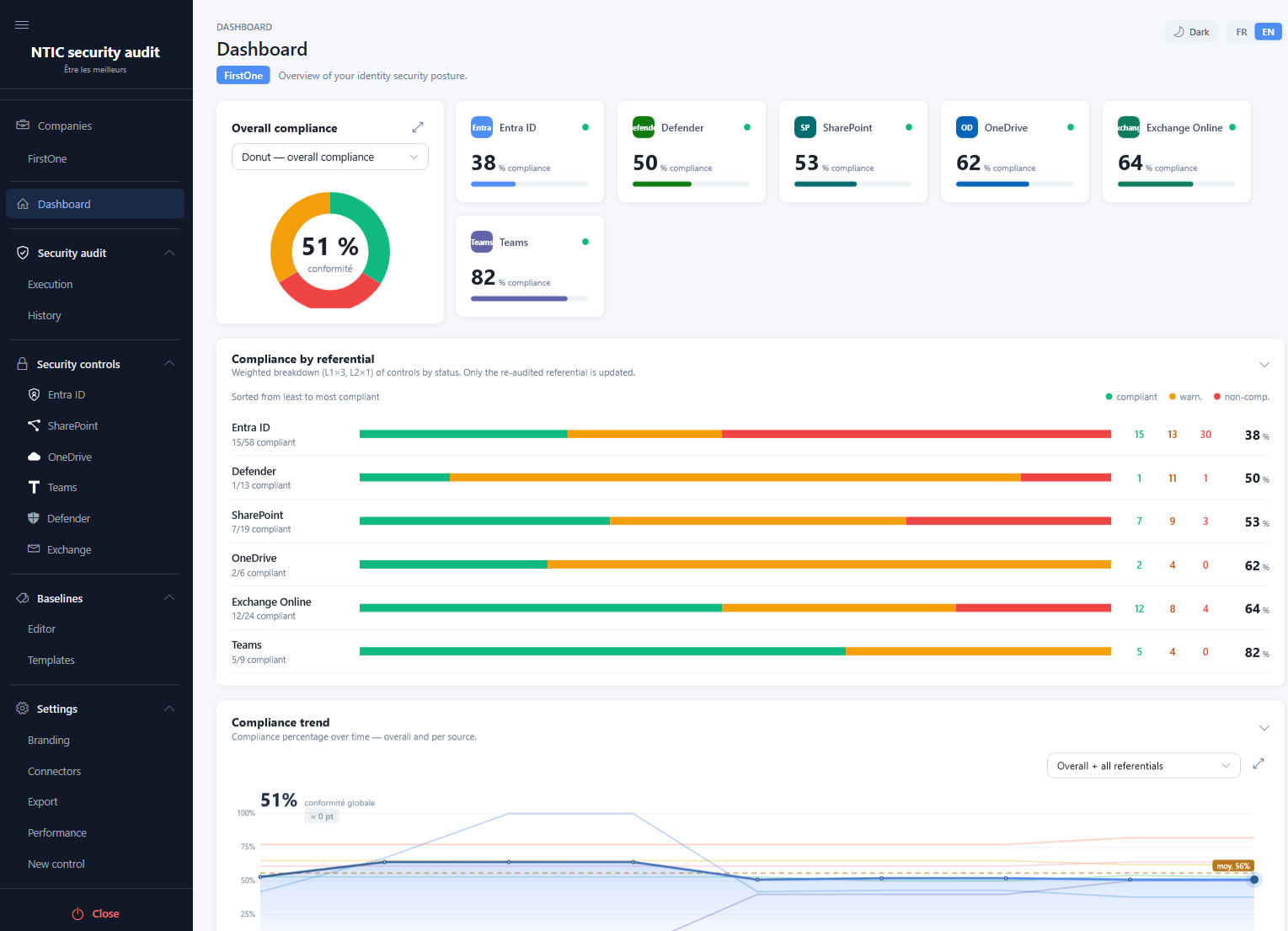
A weighted score per service, ranked from weakest to strongest, plus a trend line that carries each service's last known result forward — so a targeted re-audit never fakes a drop.
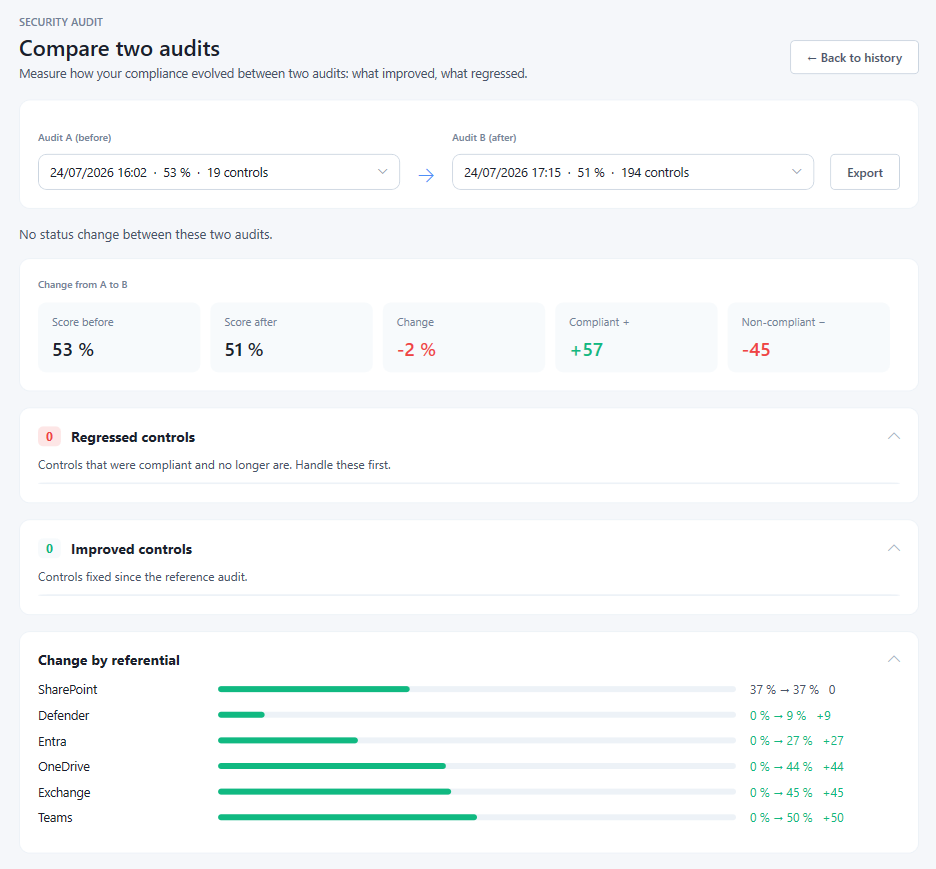
Pick two runs. Regressions come first — controls that were compliant and no longer are. Improvements, additions and scope changes follow. This is the slide that renews an engagement.
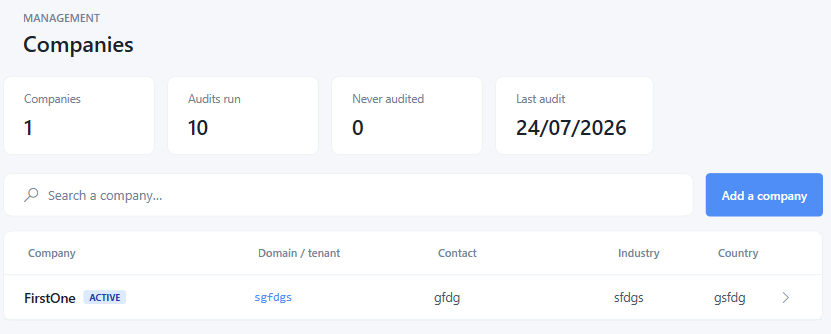
Every client in one table: last audit, current score, connectors configured. Sort it, search it, and open any engagement without touching another one's data.
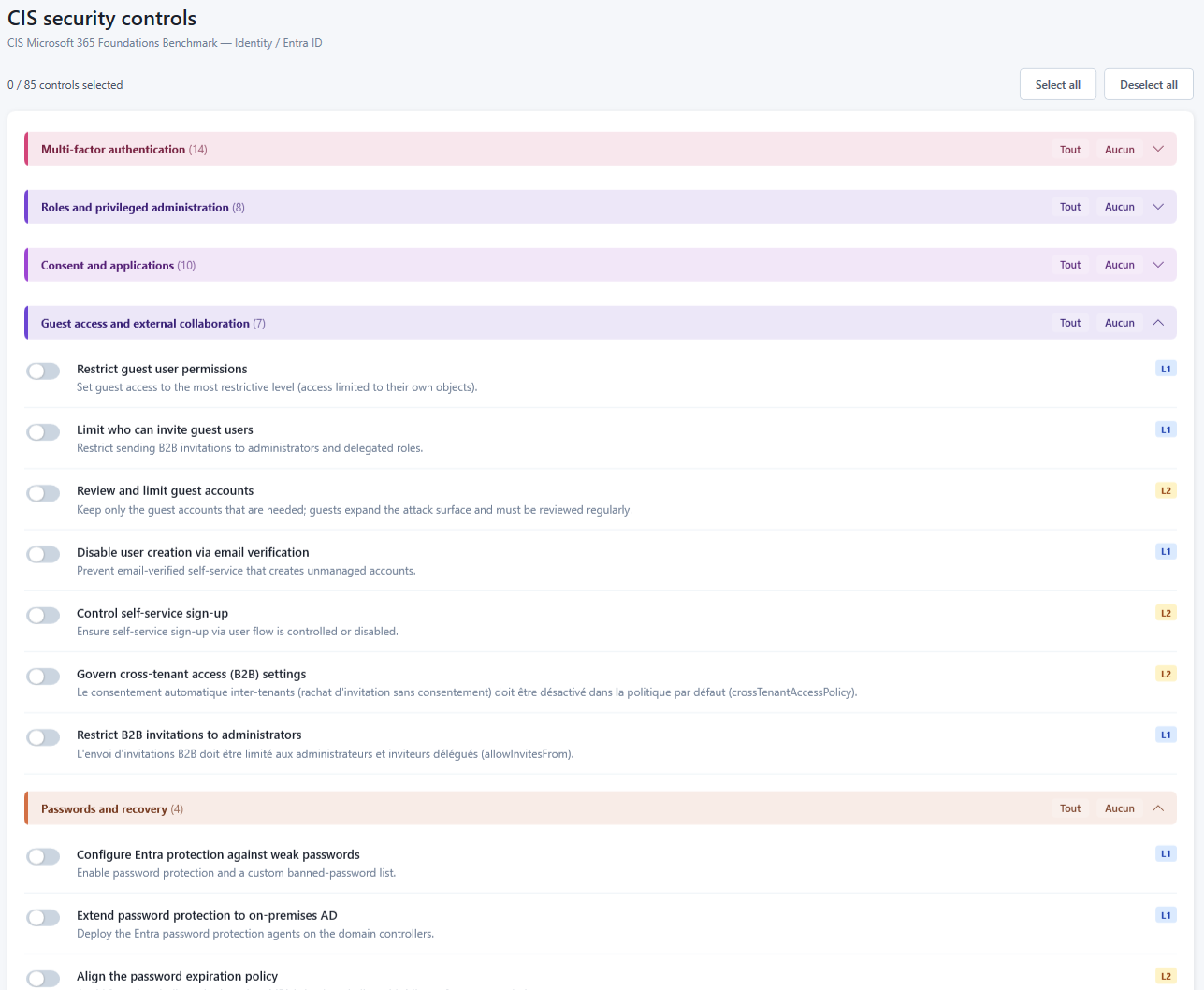
Browse all 323 controls before you run anything. Each shows its category, level and framework mapping, so you can tell a client exactly what you will and won't be testing.
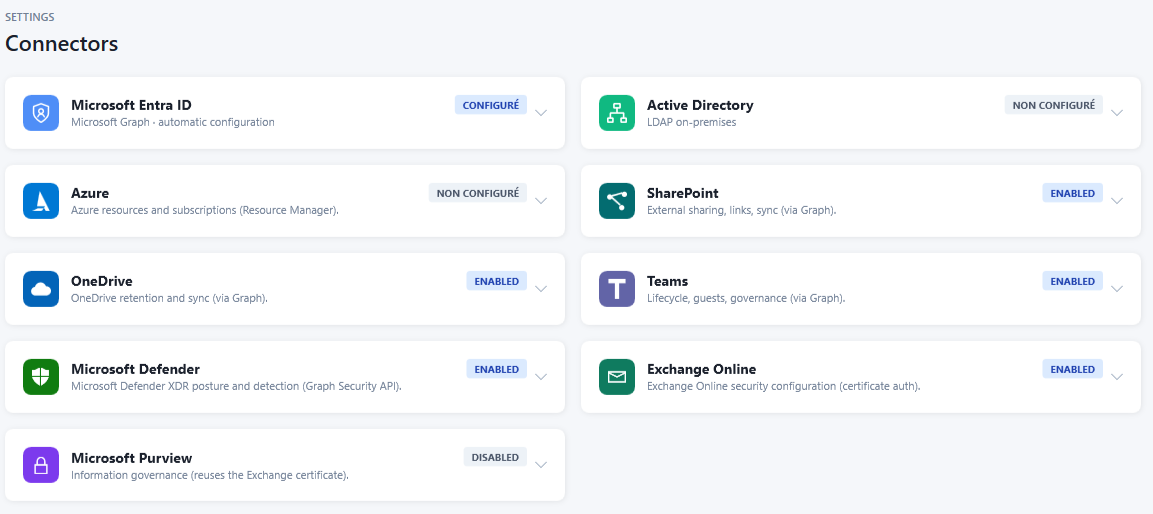
Each service has its own connector. Audit Entra ID alone on Monday and add Exchange next month — controls without a configured connector are skipped, and the app says so rather than failing quietly.
Scoping
A first pass, an ISO 27001 certification file and a monthly re-check are three different questions. A baseline is how you decide in advance — and in writing — which controls a given engagement answers, so the scope is a deliberate decision rather than whatever the tool happened to test.
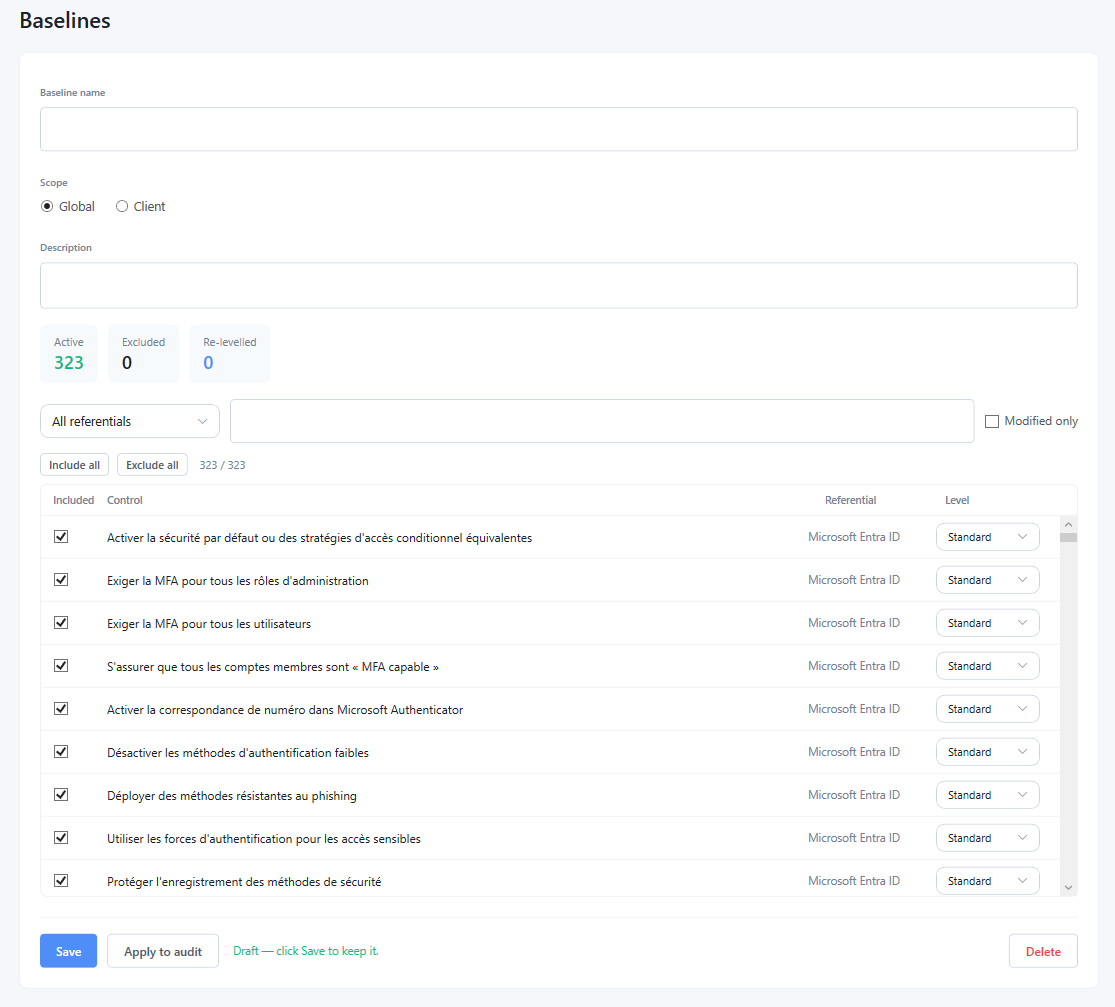
Include or exclude any control, and override its level where your judgment differs from the default. Three counters — active, excluded, re-levelled — show how far the scope has moved from the full catalogue, and modified only filters straight to what you changed. Nothing is committed until you save: an unsaved baseline is flagged as a draft.
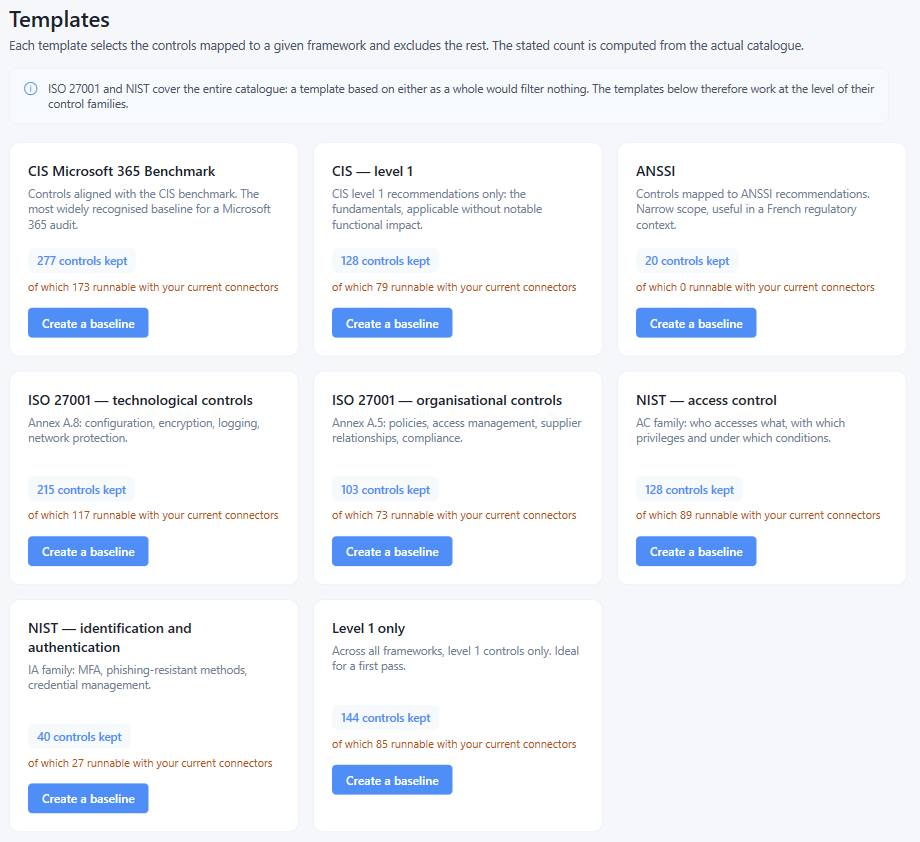
Each template keeps the controls mapped to a framework and excludes the rest. The count is computed from the live catalogue rather than written into a brochure — and a second figure tells you how many of those controls are actually runnable given the connectors you have configured, so you know what a template will really cover before you commit to it.
Scope
A global baseline is your firm's house methodology, reused on every engagement. A client baseline covers the exception you agreed with one customer — the control they have formally accepted the risk on — without polluting anyone else's audit.
Levels
A control that is standard in a fifty-seat firm can be critical in a regulated one. Re-level it per baseline and the weighting in the score and the remediation ordering follow, with the count of re-levelled controls visible so a reviewer can see you did it.
Traceability
Applying a baseline to an audit stores which controls were in scope and at what level. Two audits run under the same baseline are directly comparable; a scope change shows up in the comparison instead of quietly distorting the score.
The most widely recognised baseline for a Microsoft 365 audit, and the one most clients have heard of.
The fundamentals only: recommendations applicable without notable functional impact.
Level 1 controls across every framework. The sensible first pass on a tenant you have never audited.
Annex A.8: configuration, encryption, logging, network protection.
Annex A.5: policies, access management, supplier relationships, compliance.
The AC family: who accesses what, with which privileges, under which conditions.
The IA family: MFA, phishing-resistant methods, credential management.
Controls mapped to ANSSI recommendations — a narrow scope, useful in a French regulatory context.
One honest detail the app states on that screen: ISO 27001 and NIST map to the entire catalogue, so a template built on either framework as a whole would filter nothing at all. Those two are therefore offered at control-family level, where they actually narrow the scope. Every template is a starting point — create a baseline from it, then edit it.
Running an audit
The scope is already decided by the baseline, so starting an audit is a single button. What follows is not a progress bar you leave running over lunch: 194 controls across six Microsoft services, evaluated live, with each finding appearing the moment it is produced.
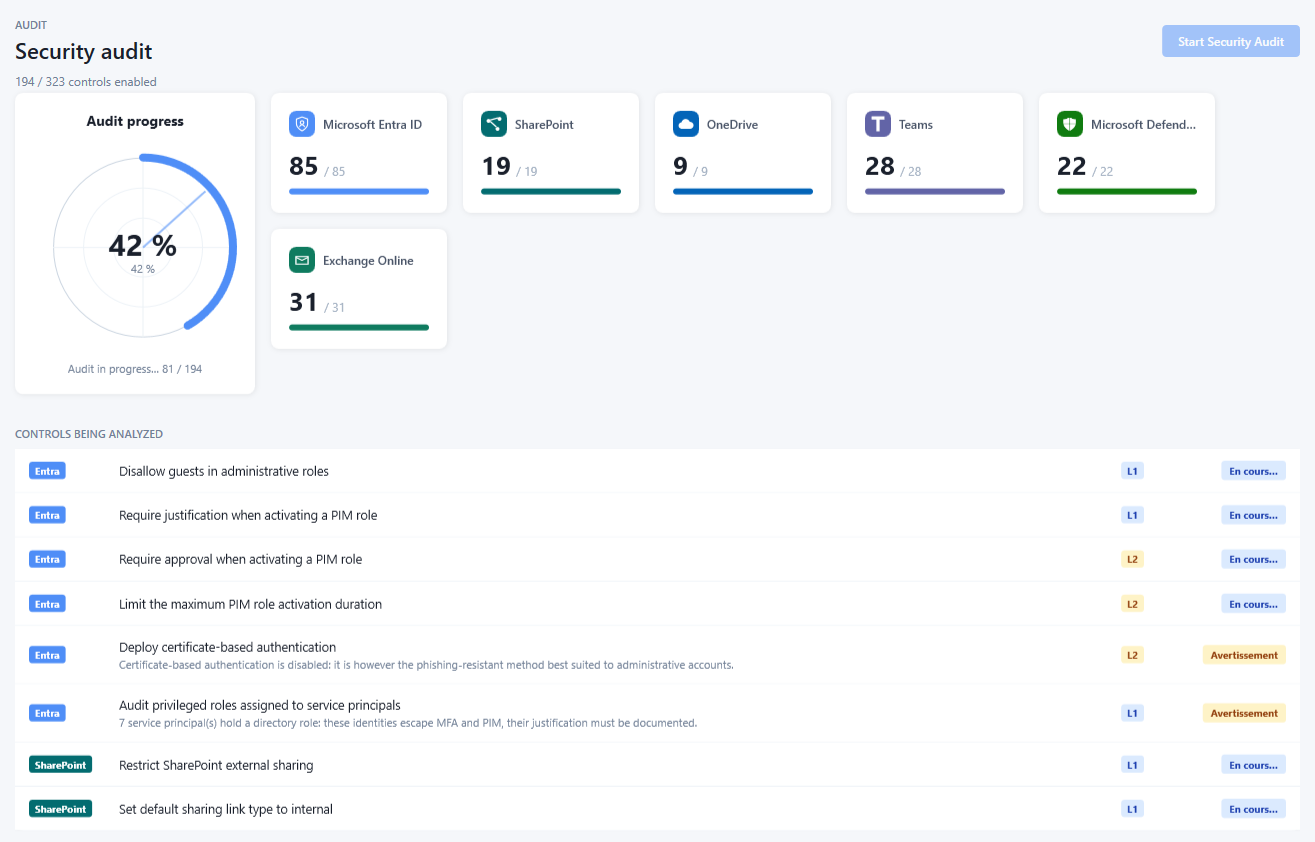
A counter per service and one overall — 81 / 194 here — with the controls streaming past as they are evaluated. Each row carries its service, its level and its verdict, and a finding that needs explaining gets its sentence immediately: "7 service principals hold a directory role: these identities escape MFA and PIM, their justification must be documented." Nothing is buffered until the end.
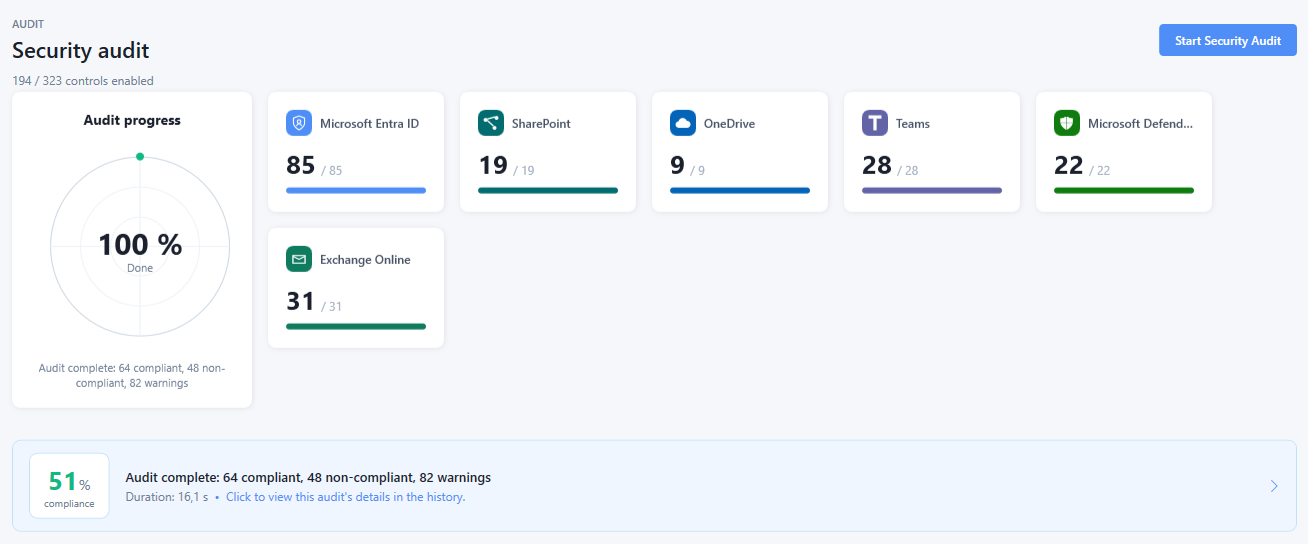
Done: 51 % compliance, 64 compliant, 48 non-compliant, 82 warnings — in 16.1 seconds. The header keeps 194 / 323 controls enabled in view throughout, so a partial run can never be mistaken for a full one, and one click goes straight to the detail.
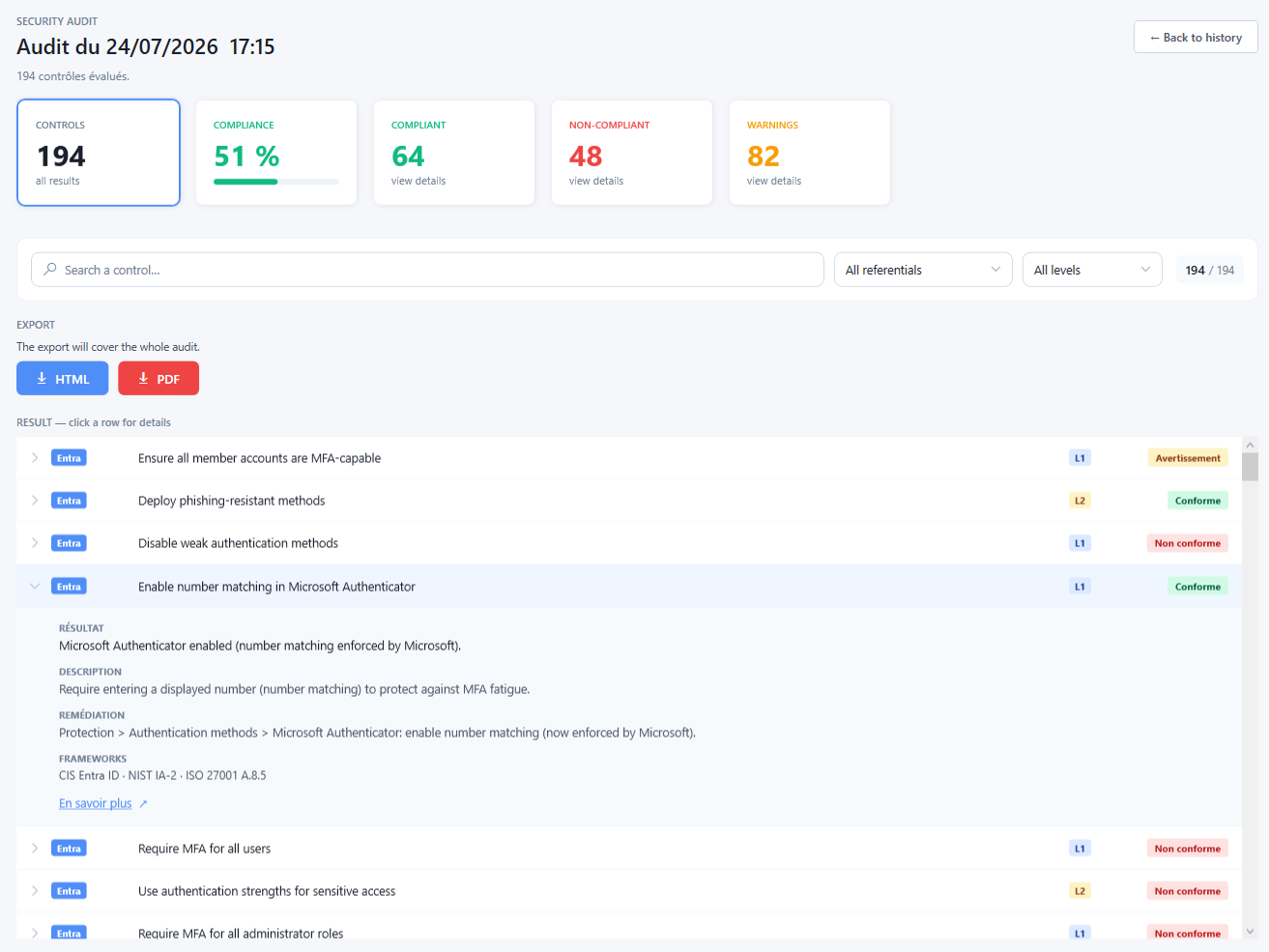
Five counters across the top, a search box and filters by referential and by level. Open a row and you get what an assessor has to write anyway: the observed state — "Microsoft Authenticator enabled (number matching enforced by Microsoft)" — what the control tests, the remediation as a portal path, and the references it satisfies: CIS Entra ID · NIST IA-2 · ISO 27001 A.8.5. Export is HTML or PDF, and the screen states that it covers the whole audit rather than the filtered view.
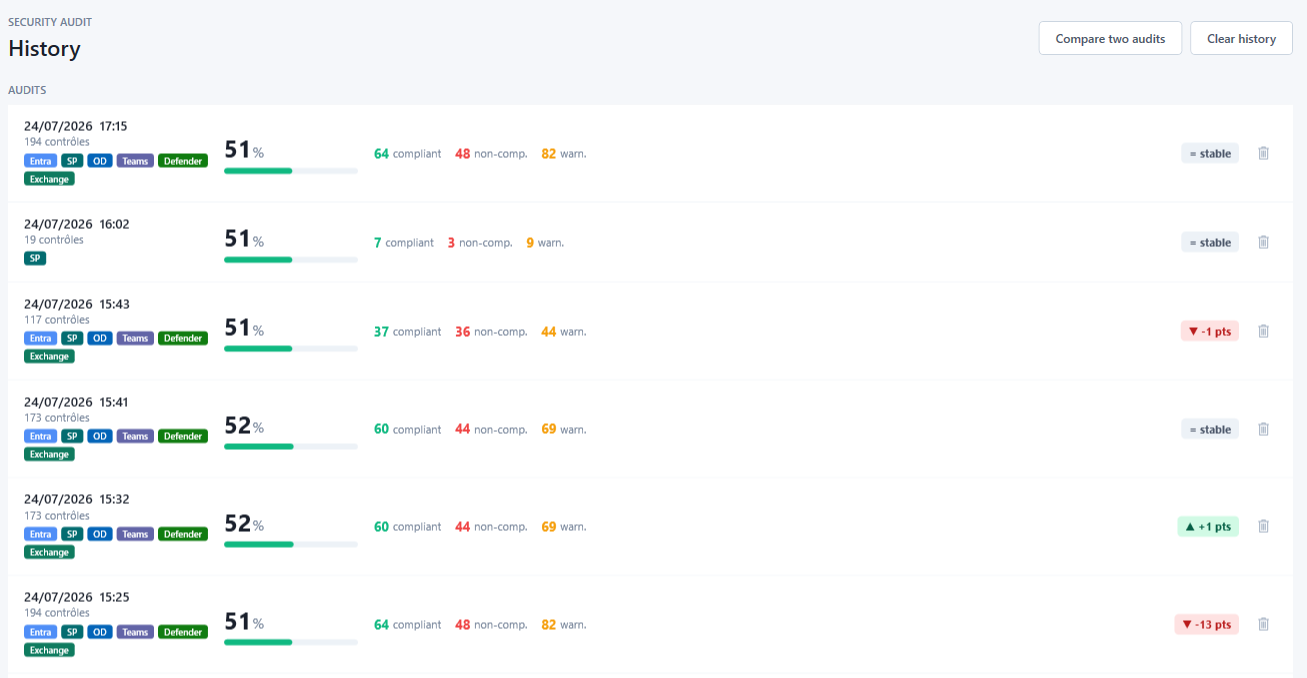
Date, number of controls evaluated, the services actually included, the score and the three counts — plus the movement against the previous run, already computed. A run over 19 controls sits next to one over 194 and is visibly not the same exercise, which is exactly what you want before you compare them.
Three outcomes
82 of those 194 results are warnings — a setting that isn't a failure but that an assessor should look at, like certificate-based authentication being disabled. A pass/fail tool has to round every one of those in some direction; here they stay visible as what they are.
Trend
Each history entry shows how it moved against the run before it — stable, up two points, down thirteen. You know whether last month's remediation worked before opening anything, and the full comparison is one button away.
Export
HTML and PDF from the results screen, and the app states plainly that the export covers the entire audit rather than whatever your current filter shows — a small thing that stops a client receiving an accidentally truncated report.
Performance
Controls are evaluated in parallel. The right number at once depends on the workstation and on how much load the Microsoft APIs will tolerate — so instead of hard-coding a guess, the application exposes the setting and measures the correct value on the machine that will actually run the audits.
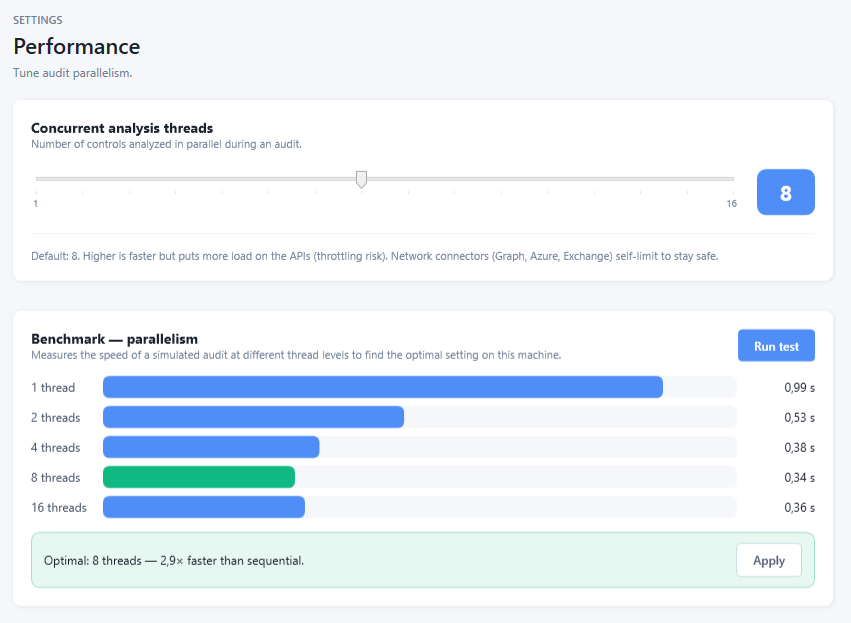
The default suits most machines. Lower it on a constrained VM or a fragile tenant, raise it on a workstation with headroom — it takes effect on the next run, with nothing to reconfigure.
The screen states the trade-off plainly: more threads means more load on the APIs and a real throttling risk. The network connectors — Graph, Azure, Exchange — self-limit regardless of where you put the slider, so a high setting degrades speed rather than breaking a client's tenant.
One click simulates an audit at each thread level and times it. On the machine in that screenshot: 0.99 s sequential, 0.34 s at eight threads — 2.9× faster — and slower again at sixteen. The curve is measured, not assumed, so the tool recommends eight instead of maxing the slider, and applies it for you.
This is the mechanism behind the sixteen-second run in the section above, and it is the kind of thing that decides whether an auditor uses a tool twice. Anyone who acquires the product gets the knob and the benchmark along with the rest of the source.
What you hand over
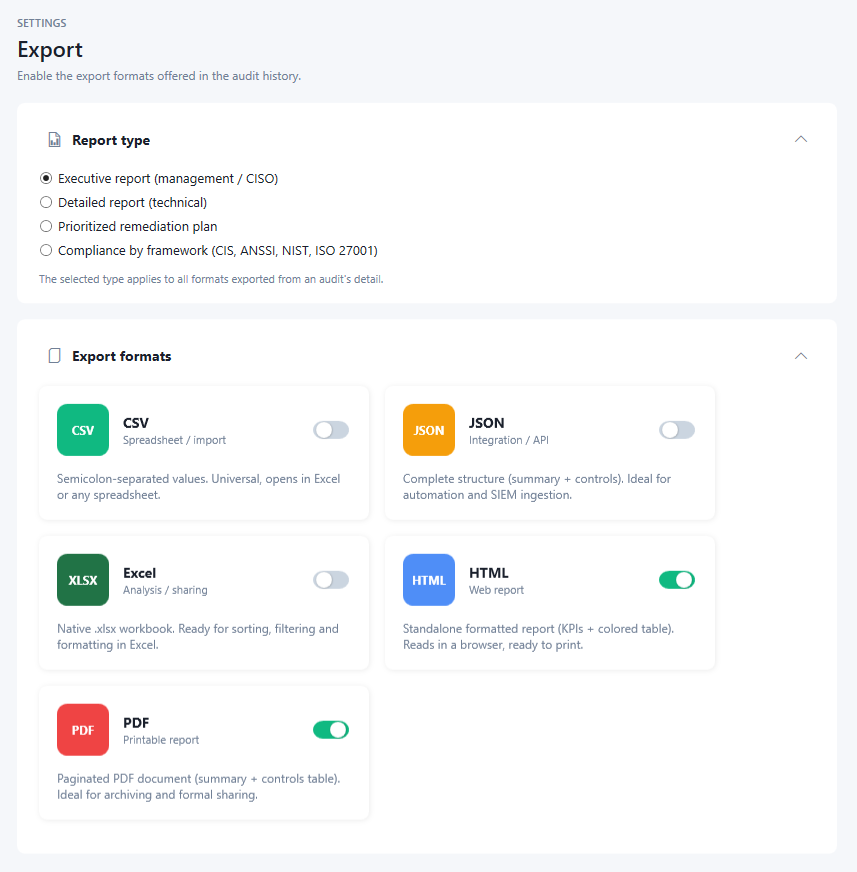
The same audit produces the document each reader actually needs — from a one-page board summary to a line-by-line remediation plan an engineer can work through.
Cover page under your brand and the client's, overall posture, per-service breakdown, and the findings that matter to a board.
Every control, its verdict, the objects concerned, and the reference it was tested against.
The same results re-cut by CIS, NIST, ISO 27001 and ANSSI — the view an assessor asks for.
Failures ordered by weight, with the portal path and PowerShell command for each fix.
How an engagement runs
Create the company record. Its name is what appears on every report you export for them.
Register a read-only application in the tenant — the app walks you through it — or point it at an existing one. Add Active Directory over LDAPS if the client runs a hybrid estate.
Run the full catalog, or apply a baseline: CIS level 1 for a first pass, ISO 27001 technological controls for a certification file, or your own saved selection.
The audit executes read-only against the APIs. Export the report your client needs, under your brand, and keep the run in history for the next comparison.
Security & privacy
You're asking a client for access to their identity platform. Here is exactly what happens to it.
Read-only
Every check is a read. The application holds no write permission and changes no setting in any tenant — a client can verify it on their own consent screen.
On your machine
No vendor backend, no telemetry, no upload. Audit results, findings and reports are written to your workstation and go nowhere else.
Encrypted secrets
Client secrets and service account passwords are encrypted with Windows DPAPI, scoped to your user account. A copied settings file is unreadable elsewhere.
Retained evidence
Audit history is kept for three years — a full ISO 27001 certification cycle — so you can show a trajectory, not just a snapshot.
Under the hood
The person who decides whether an audit happens is rarely the person who commissioned it. It is the client's IT or security lead, who will want to know what gets installed, what it is allowed to touch, and what happens on a tenant considerably larger than a demo.
Delivery
A Windows desktop application. There is no server to stand up, no agent to deploy on endpoints or domain controllers, no inbound firewall rule and no service account running permanently somewhere. It runs under the consultant's own session, for as long as the audit takes, and then it stops.
Data path
Outbound HTTPS to Microsoft endpoints and, for on-premises audits, LDAP or LDAPS to a domain controller. Results are written to a local store on the machine that ran the audit. There is no vendor backend in the path, so there is no third party to add to a client's processor register.
Execution
Controls are evaluated concurrently with a configurable thread count, and the Graph, Azure and Exchange connectors self-limit regardless of that setting, so an aggressive configuration slows the audit instead of tripping API throttling on a client's tenant. The same baseline evaluates the same controls in the same order every time.
Scale
Run against production tenants with several thousand users, where collections have to be paged rather than fetched in one call and where a naive implementation either times out or silently truncates. Directory size changes how long the paging takes; it does not change which controls run or what they conclude.
Partial coverage
Audit only Entra ID today and add Exchange next month. Controls with no configured connector are reported as out of scope and counted as such, never as failures — the compliance score is computed on what was actually evaluated, and the run states how many controls that was.
Credentials
Certificates, client secrets and service account passwords are encrypted with Windows DPAPI scoped to the user account, stored per client workspace. A settings file copied to another machine is unreadable, and one client's credentials are never loaded while auditing another.
| Connector | Authenticates as | Rights required | Write access |
|---|---|---|---|
| Microsoft Entra ID | An application registered in the client tenant, authenticating by certificate. Provisioning can be automatic, or the registration can be created by hand; a client secret is supported but discouraged, because secrets expire. | Directory.Read.AllPolicy.Read.AllRoleManagement.Read.AllReports.Read.AllAuditLog.Read.AllFive read scopes, granted once, visible on the client's consent screen. |
None |
| Microsoft 365 workloads | The same Entra ID application — Exchange Online, Teams, SharePoint, OneDrive, Defender and Purview checks reuse it. | No additional grant, and no second credential to store or rotate. | None |
| Azure | The same application, assigned through Access control (IAM) on the subscription or management group. | The built-in Reader role. Nothing else — not Contributor, not Security Admin. |
None |
| Active Directory | A domain account, reaching a domain controller over LDAP (389) or LDAPS (636). | Standard read access. No Domain Admin, no delegation, no privileged group membership — and if the domain controllers have no certificate for LDAPS, that is itself one of the findings. | None |
The column that matters is the last one. Not “write access we promise not to use” — write access that was never requested, which is why a client can verify the claim on their own consent screen in about fifteen seconds rather than taking your word for it.
For auditors & assessors
An assessment stands or falls on whether someone else can re-run it and reach the same conclusion. EntraGUARD was built around that constraint: every verdict carries the control it came from, the objects it looked at, and the date it was taken.
Traceability
A non-compliant control doesn't just say "fail". It lists the accounts, mailboxes, policies or resources that caused it, timestamped and attributed to the tenant it was read from — the level of detail a working paper actually needs.
Reproducibility
Scope is declared as a baseline and stored with the run. A second assessor applying the same baseline to the same tenant evaluates the same 323 checks in the same order, and any difference is a real change in the environment.
Independence
The tool holds no write permission, so running an audit never alters the environment under assessment and never competes with the client's own change process. The consent screen is the proof.
Framework view
The same run produces a compliance view per framework, with the clause reference on each control — so a certification file, a client questionnaire and a gap analysis all come out of one execution.
Working papers
Results export as structured data for sampling, for a GRC platform, or for whatever spreadsheet your methodology already runs on. Nothing has to be retyped out of a report.
Continuity
Runs are retained for a full ISO 27001 certification cycle, so a surveillance audit can be answered with a trajectory — what was found, what was fixed, and when — instead of a fresh snapshot.
Why now
Microsoft 365 and Entra ID are the identity layer for most organisations, credentials are how most intrusions now begin, and a run of regulations has turned “we take security seriously” into “show us the evidence.” None of those three reverses next year, which is what separates a market from a wave.
The install base
Everyone is a candidate
Entra ID is the front door to mail, files, Teams and increasingly to the cloud infrastructure behind them. Auditing identity means auditing the thing everything else depends on — and there is no vertical to specialise into, because the tenant is the same shape at a law firm, a hospital and a manufacturer.
The attack path
Intrusions start with a valid login
Incident reporting has converged on the same finding for several years running: attackers increasingly sign in rather than break in. That moves identity configuration out of IT hygiene and into the first question an insurer, a board or a forensic team asks after an incident — and the first one asked before it.
The obligation
Evidence, on a deadline
NIS2, DORA, ISO 27001:2022, SOC 2, CMMC, HIPAA. Different scopes and different regulators, one shared requirement: documented, repeatable proof that access controls are configured the way you say they are. A screenshot pasted into a Word document stopped being an answer.
The bottleneck
Demand is not the constraint
The organisations being asked mostly cannot answer for themselves, so they ask their MSP or their consultancy — who answer by hand, in a spreadsheet, over two days per tenant. What limits this market is not appetite. It is the number of people who can produce the evidence, which is exactly what a tool changes.
NIS2EU Directive 2022/2555
Member states had to transpose it by October 2024; national enforcement has been ramping since. It pulls in far more mid-sized entities than the directive it replaced, and requires risk management measures to be demonstrable rather than declared.
DORAEU Regulation 2022/2554
Applicable since January 2025 to EU financial entities and, critically, to their ICT service providers. Access control and authentication sit squarely inside the resilience requirements.
ISO 27001:2022Annex A.5 and A.8
Certificates issued against the 2013 version had to migrate by October 2025. The 2022 Annex A puts configuration, access management and logging explicitly in scope — the exact ground a tenant audit covers.
CMMCUS Department of Defense
Phased into defense contracts from 2025, flowing down the supply chain to companies with no security team at all. Access control and identification and authentication account for the largest share of the requirements.
SOC 2 · HIPAAongoing, and tightening
Neither is new, but the evidence bar keeps rising: anyone selling software to a US enterprise is asked for CC6 and CC7 evidence, and any organisation touching health data is asked for its technical safeguards in writing.
Deliberately absent from this section: a market-size forecast. Anyone can buy one, nobody can verify it, and every line above can be checked against a published text instead. The point is not that the market is large — it is that the obligations have dates on them, and the people being asked still answer by hand.
For resellers & consultancies
Most Microsoft-focused resellers and consultancies sell licenses, migrations and managed services, then subcontract the security review. Here you are not becoming someone's reseller — you are buying the product and adding an audit line to your own catalog, priced however you want.
Your price list
Charge per audit, per tenant, per quarter, or fold it into an existing retainer. Nobody sets a floor, nobody sets a ceiling, and no part of what you invoice comes back to us.
Your economics
A single fixed cost paid once, against revenue that repeats on every engagement. The tenth audit you sell costs you nothing to deliver beyond your engineer's time.
Your organisation
Every consultant, every office, every legal entity in the group. There is no seat count to declare and no license server to check in with.
Your methodology
With the source code you can add your own controls, restructure the report to match your existing deliverables, or export straight into the GRC platform your practice already runs on.
Your clients
We never appear in front of your clients, because after the sale there is no relationship to appear in. No co-branding to negotiate, no deal registration, nobody to lose the account to.
Your differentiation
Competing firms bid the same subcontracted review at the same day rate. A tool carrying your own name, producing evidence in a day, is a different conversation in a tender.
Your sales machinery
Selling the product under your own name only works if you can hand a key to a customer without asking anyone's permission. The generator that produces those keys is part of what you buy — a separate tool you keep, alongside the activation screen your customers see.
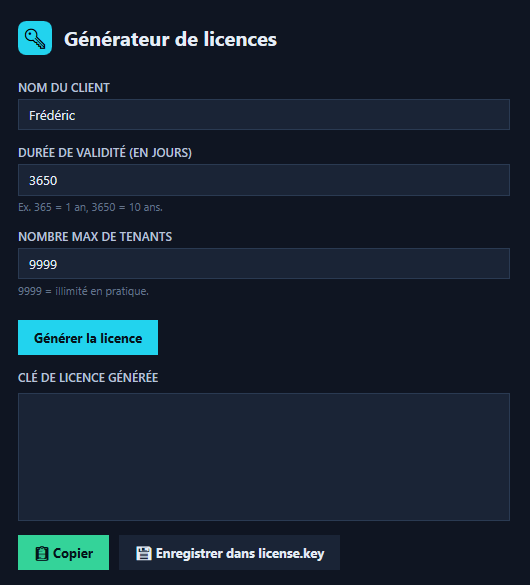
A client name, a validity in days — 365 for a year, 3650 for ten — and a tenant ceiling. Generate, copy, or write it straight out as license.key. Every commercial decision you make is expressed in those three fields, which means your price list can be whatever you want it to be: annual, multi-year, metered by tenant, or a fortnight's trial for a prospect.
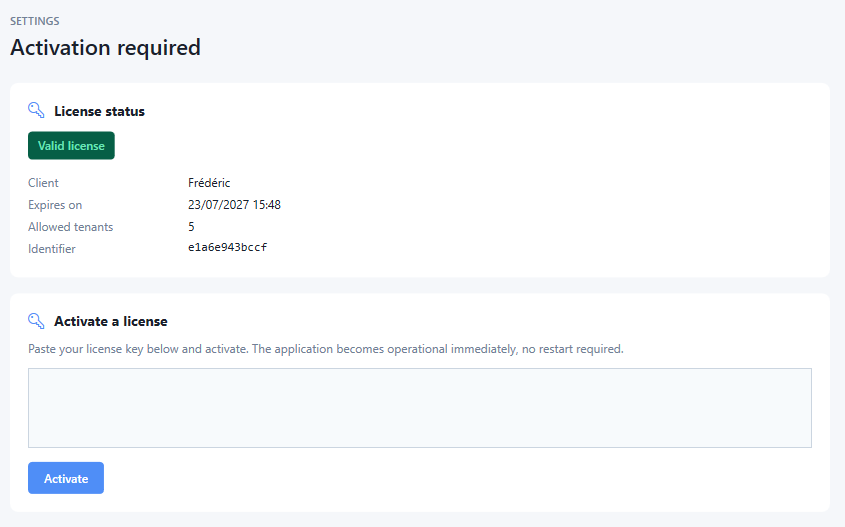
Paste, activate, done — operational immediately, with no restart. From then on the status card states plainly who the licence belongs to, when it expires, how many tenants it allows and its identifier, so a support call starts with facts rather than questions. Nothing here carries our name.
Your terms
The two fields that decide what a licence is worth are yours to set on every sale. A one-year, five-tenant key for a small consultancy and a ten-year unlimited one for a group are the same amount of work: fill in two boxes.
Your ceiling
The tenant cap exists so you can meter what you sell — 9999 is unlimited in practice, and that is what your own key looks like. Whether your customers get the same or a counted allowance is a pricing decision, not a product limitation.
Your pipeline
You generate keys on your own machine. We are not in the loop, which means no waiting on our office hours to close a deal, and no list of your customers sitting in someone else's records.
Your trials
Issue a fourteen-day key to a prospect and let them audit their own tenant. It expires by itself, so there is no licence to chase and no reason to be cautious about handing out evaluations.
Price & ownership
There is no licensing ladder, no tenant count to declare, no renewal and no revenue share. You buy EntraGUARD once, at a fixed price that is the same for everyone. After that you rebrand it, modify it, price it and run it exactly as your organisation decides — we have no say in it and take nothing further.
One-off · perpetual · unlimited
€00,000
Paid once. Nothing is owed afterwards — no annual fee, no royalty, no per-client charge, no reporting obligation.
Yours in name
Nothing refers to us
Product name, logo, icon set, installer, in-app identity, documentation and every exported report carry your brand. Once delivered, the word EntraGUARD appears nowhere in what you ship.
Yours to modify
Source code, not a black box
Add controls, change the report layout, plug it into your GRC stack, extend the connectors, take it in a direction we never planned. Your engineers own the codebase and need no permission.
Yours to sell
You set the prices
Per audit, per tenant, bundled into a retainer, or given away to win the migration behind it — your commercial model, your contracts, your margin. We take no share of anything you invoice.
Yours to run
No limit to declare
Unlimited tenants, unlimited clients, unlimited engineers, unlimited installations, in as many offices or entities as you have. Nothing meters your use and nothing expires.
How it runs: a mutual NDA, a technical review so you see exactly what you are buying, one contract, then handover. Ongoing maintenance — Microsoft API changes, CIS revisions, new controls — is available as a separate annual contract if you want it, and entirely optional: the product you bought keeps working either way.
For investors & acquirers
The market case is set out above. What is on the table here is a finished, shipping product positioned inside it: the asset is the control catalog, the framework mappings and the engine that runs them.
323
Implemented controls
Every one backed by a live API check — the catalog is the barrier to entry, and it took years of Microsoft-specific work
9
Microsoft services
Entra ID, Active Directory, Azure, Exchange, Teams, Defender, SharePoint, Purview, OneDrive
4
Frameworks mapped
CIS, NIST 800-53, ISO 27001 and ANSSI — the mapping layer is what makes the output sellable to auditors
0
Cloud infrastructure
Desktop delivery means no hosting cost, no data-processor liability and gross margin that doesn't degrade with volume
The market
MSPs, consultancies and audit firms buy the product outright and monetise it across their whole client portfolio — a single high-ticket transaction instead of a per-seat grind, with an optional annual maintenance contract behind it.
Defensibility
Building 323 working checks across nine Microsoft APIs, then keeping them aligned with CIS revisions and Microsoft's own changes, is slow work that cannot be shortcut with a wrapper around Secure Score.
Expansion
The same connectors and control model extend to guest lifecycle governance, continuous monitoring and a hosted multi-tenant portal — near-term additions rather than a second product to invent.
What transfers
A transaction can cover the source code and IP, the control catalog and its framework mappings, the report templates, the EntraGUARD name and domains, and a defined transition period with the author.
Structures
Full acquisition, an equity stake with the founder continuing development, or a funded roadmap with exclusive distribution rights — the structure is open.
Diligence
Financials, customer detail, roadmap, architecture documentation and a technical walkthrough of the codebase are available to qualified parties once an NDA is in place.
Serious enquiries only, please — use the form below and select Investment or acquisition. An NDA can be executed the same week.
After the purchase
Nothing in the agreement obliges you to come back to us, and nothing in the product requires it — you have the source, the build chain and the documentation. But the engineers who wrote it are still available, and most buyers would rather have a change built in a week than staffed internally in a quarter.
Evolution requests
Ask for a change, get a build
A new control, another connector, a different report layout, an export one of your clients insists on. You could do it yourself — the code is yours — but the engineers who built the 323-control catalogue will do it faster, and hand it back as a build you can ship.
Documentation
A complete guide, and the technical set
An end-to-end application guide you can put your own cover on and hand to your consultants or your clients, plus what your engineers need: architecture, control catalogue, connector model, build and release process.
Web presence
A professional site for the product under your name
Exactly what you are reading. This page is the example: a one-page site built around the product, its screenshots and its argument — rebuilt under your brand, your name and your positioning, ready to publish.
Content
And a blog, if you want to be found
What makes a site like this rank is not the design but what sits behind it — the fourteen articles already published here are the example. We can write and structure the content — Microsoft 365 auditing, CIS benchmarks, Entra ID hardening — for a product that carries your name rather than ours.
All of it is optional and quoted separately. The purchase price covers the product: none of these are gates you have to pay to get through, and the application works without a single one of them.
Questions we get
No. The audit runs on read-only Microsoft Graph permissions. A Global Administrator is only needed once, to consent to the application registration — the same consent any read-only tool requires. After that, the audit account holds no privileged role.
There is no limit, because there is nothing to meter. The application manages client companies side by side, each with its own connectors, history and branding, and the purchase covers as many as you ever open — one or five hundred.
Five read scopes on Microsoft Graph — Directory.Read.All, Policy.Read.All, RoleManagement.Read.All, Reports.Read.All and AuditLog.Read.All — plus the built-in Reader role if you audit Azure, and a standard read-only domain account for on-premises Active Directory. No write scope is requested anywhere, which your client can confirm on their own consent screen. The full table is here.
Only the API calls to Microsoft, made from your workstation. There is no vendor backend, no analytics, and no upload of findings. Reports are files on your disk until you choose to send them.
It's covered — 58 controls over domain policy, privileged groups, delegation, Kerberos and stale accounts, queried over LDAP or LDAPS with a read-only service account.
Yes. The catalog loads from control packs, and you can import additional packs alongside the official ones. Custom checks can be defined declaratively against Graph, ARM or LDAP.
Seconds, not hours. A 194-control run across six Microsoft services completes in about sixteen seconds on a normal workstation, because the controls are direct API reads rather than scripts spawning sessions. The time in an engagement goes into consenting the connectors and reading the findings, not waiting for the tool.
No. The connectors that talk to Graph, Azure and Exchange self-limit whatever you set the thread count to, so the worst case of an over-ambitious setting is a slower audit rather than a throttled tenant. The default is eight concurrent controls, adjustable from one to sixteen, and a built-in benchmark measures the optimum on your own machine.
Yes, and you should. We run a full audit against one tenant of yours, with your engineers watching, and you keep the reports whatever you decide afterwards. For a purchase of this kind there is also a technical review of the codebase before signature.
Yes. One figure, the same for a two-person consultancy and for a group with forty offices, covering the product, the source code and the right to exploit it commercially without restriction. There is no tier above it and nothing held back to sell you later. The only optional extra is an annual maintenance contract, and the product works without it.
Yes, in full, with the build and packaging chain, the control catalog and its framework mappings, the report templates and the technical documentation. You are not licensing a binary — your engineers can compile, modify and extend it without asking us anything.
You generate the key yourself, with the licence generator that ships with the product: a client name, a validity in days and a maximum number of tenants. Your customer pastes it into the activation screen and the application is operational immediately, with no restart. We are not involved in any of it and never learn who your customers are.
You can do better than resell it: you own it, so you sell your own product at your own price under your own name. There is no reseller agreement, no margin schedule and no revenue share, because after the purchase there is nothing linking your sales to us.
Yes, and all of it optional. Our engineers take evolution requests on demand — new controls, new connectors, report changes — and we can supply a complete application guide, the technical documentation, a professional website for the product under your name, and the blog content behind it. Priced separately; the product needs none of it to work.
Yes, and to structures short of a full sale — an equity stake, a funded roadmap, or exclusive distribution. Financials, architecture documentation and a code walkthrough are available under NDA. Ask through the form and say which structure interests you.
Get the terms
Ask and you get the figure, the contract and what happens on handover — not a discovery call to qualify you first. Answers usually come the same business day.